
WaldenPay API
Accept card payments host-to-host: you collect card data on your own PCI DSS-compliant pages and submit it to the WaldenPay API. There is no hosted checkout page or redirect — your customer never leaves your site.
Overview
https://gw.waldenpay.comA typical integration is three steps:
- Create a payment server-side and receive a one-time charge token.
- Charge the card using the token, with card data collected on your page.
- Confirm the outcome via webhook or by retrieving the payment.
Host-to-host mode requires PCI DSS compliance on your side, since card data passes through your pages and servers. Contact support to confirm your compliance status before going live.
How it works
The full payment lifecycle, from order to confirmation. Your customer never leaves your site except for an optional, issuer-hosted 3D Secure challenge.
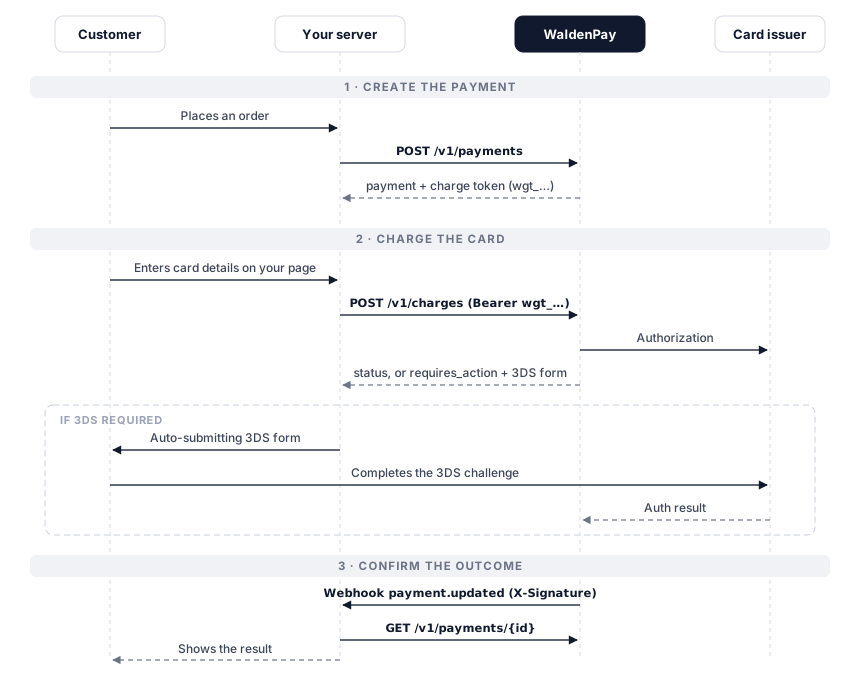
- The customer places an order on your website.
- Your server creates a payment (
POST /v1/payments) with yourcallback_url,return_urland the payer'scustomerprofile, and receives a payment ID and a one-time charge token. - You render your own card form. The customer enters their card details.
- Your server (or the payment page) submits the card data with the charge token (
POST /v1/charges). - If the issuer requires 3D Secure, the response contains an
action— render it as an auto-submitting form; the customer completes the challenge on the issuer's page and returns to yourreturn_url. - WaldenPay records the final result and sends a signed
payment.updatedwebhook. - Your server confirms the outcome from the webhook — or by retrieving the payment — and shows the customer the result.
For transitional results (a charge response with status: "processing"
and no action), don't poll in a tight loop — wait for the webhook, or reconcile
after a short delay.
Authentication
All /v1 endpoints (except card charges) use HTTP Basic
auth:
| Field | Value |
|---|---|
username | Your merchant ID (wma_…) |
password | Your API key (wk_…) |
curl https://gw.waldenpay.com/v1/payments \
  -u "wma_your_merchant_id:wk_your_api_key" \
  -H "Content-Type: application/json"
Card charges (POST /v1/charges) instead use
Authorization: Bearer <charge token> — the single-use
wgt_… token returned when the payment is created. Keep your API key
server-side only; the charge token is safe to use from the page performing the
charge.
Domains
Every payment must be associated with a domain you are approved to accept
payments from. This domain is sent with the payment as its
merchant_url, so a terminal cannot take payments until at least one
domain is enabled for it.
How domains are set up:
- WaldenPay approves the set of domains allowed for your account. If you need a new domain added, contact support.
- In the Terminals page you choose which of your approved domains are enabled on each terminal. The Primary terminal always has every approved domain enabled.
-
When you create a payment on a terminal, WaldenPay sends one of that terminal's
enabled domains as the
merchant_url.
In your API call, merchant_url is optional:
- Omit it and WaldenPay uses the terminal's first enabled domain automatically — no code change is required if your terminal has domains enabled.
-
Send it to pick a specific domain when a terminal has several enabled. The value
may be a bare host (
shop.example.com) or a full URL (https://shop.example.com/checkout); it is normalized to the host. It must be one of that terminal's enabled domains.
422 no_enabled_domain, and a merchant_url that is not
enabled for the terminal is rejected with
422 merchant_url_not_enabled. Enable the domain on the terminal (or
have it approved for your account) before charging.
Create a payment
/v1/paymentsCreates a payment and returns a charge token for submitting card data. Call this from your server when the customer starts checkout. The terminal must have at least one enabled domain — see Domains.
Request body
| Parameter | Type | Description | |
|---|---|---|---|
amount | number | required | Payment amount, e.g. 42.5. Must be positive. |
currency | string | required | 3-letter ISO 4217 code — EUR or USD, depending on the processing currency enabled for your account region. Payments in a currency not enabled for your account fail with 422 unsupported_currency. |
reference_id | string | optional | Your order reference. Must be unique per merchant; generated if omitted. |
test_mode | boolean | optional | Create the payment in test mode. Defaults to false. |
description | string | optional | Human-readable description. |
merchant_url | string | optional | Domain the payment originates from. Must be one of the domains enabled for the terminal; defaults to the terminal's first enabled domain. Payments fail with no_enabled_domain if the terminal has no enabled domain. |
metadata | object | optional | Arbitrary key–value data returned with the payment. |
customer | object | required | The payer's details — see the field list below. Incomplete profiles fail with 422 invalid_customer. |
callback_url | string | required | Webhook URL for this payment's status updates. May only be omitted if a default callback URL is configured for your account; otherwise creation fails with 422 missing_callback_url. |
return_url | string | required | URL the customer returns to after 3DS. Missing or malformed values fail with 422 missing_return_url / 422 invalid_return_url. |
return_urls | object | optional | Per-outcome return URLs. |
expires | string | optional | Payment expiry. |
The customer object
Acquiring and anti-fraud rules require a complete payer profile with every
payment. All fields below are validated at creation time; the first missing or
malformed field is reported in the 422 invalid_customer error
message.
| Field | Type | Description | |
|---|---|---|---|
first_name | string | required | Payer's first name. |
last_name | string | required | Payer's last name. |
email | string | required | Payer's email address. |
phone | string | required | Phone number in international format, e.g. "+14155550101". |
date_of_birth | string | required | Payer's date of birth, YYYY-MM-DD. |
address | object | required | Payer's billing address — see below. |
reference_id | string | optional | Your identifier for this payer; used for recurring-payer recognition. |
address field | Type | Description | |
|---|---|---|---|
address | string | required | Street address line, e.g. "Main Str. 123". |
city | string | required | City. |
country | string | required | Country name or code, e.g. "Germany". |
postal_code | string | required | Postal / ZIP code. |
street | string | optional | Street name, if you track it separately from the address line. |
state | string | optional | State / region code. |
Example request
curl https://gw.waldenpay.com/v1/payments \
  -u "wma_your_merchant_id:wk_your_api_key" \
  -H "Content-Type: application/json" \
  -d '{
    "reference_id": "order-1001",
    "amount": 42.5,
    "currency": "EUR",
    "test_mode": true,
    "merchant_url": "shop.example.com",
    "callback_url": "https://merchant.example/webhook",
    "return_url": "https://merchant.example/thanks",
    "description": "Order 1001",
    "customer": {
      "first_name": "Jane",
      "last_name": "Doe",
      "email": "[email protected]",
      "phone": "+14155550101",
      "date_of_birth": "1991-02-03",
      "address": {
        "address": "Main Str. 123",
        "city": "Frankfurt",
        "country": "Germany",
        "postal_code": "54321"
      }
    }
  }'
Response 201
{
  "payment": {
    "id": "wpi_k2m4x8p1q9r7s5t3",
    "reference_id": "order-1001",
    "status": "new",
    "is_final": false,
    "reason": null,
    "amount": 42.5,
    "currency": "EUR",
    "amount_paid": null,
    "amount_refunded": null,
    "test_mode": true,
    "description": "Order 1001",
    "metadata": null,
    "card": null,
    "charge": {
      "token": "wgt_7d2f9a1c4e6b8035",
      "url": "https://gw.waldenpay.com/v1/charges"
    },
    "callback_url": "https://merchant.example/webhook",
    "created": 1752566400,
    "updated": 1752566400
  }
}
Store payment.id and use charge.token in the next step.
A duplicate reference_id returns
409 duplicate_reference_id.
Charge a card
/v1/chargesSubmits card data for a payment. Authenticate with the charge token — no Basic auth:
Authorization: Bearer wgt_7d2f9a1c4e6b8035
Request body
| Parameter | Type | Description | |
|---|---|---|---|
card_number | string | required | Card PAN, digits only. |
cvv | string | required | Card security code. |
exp_month | string | required | Two-digit expiry month, e.g. "10". |
exp_year | string | required | Two-digit expiry year, e.g. "35". |
card_holder | string | required | Cardholder name as printed on the card. |
browser_info | object | required | The payer's browser environment, used for 3DS 2.0 risk assessment — see the field list below. Incomplete objects fail with 422 invalid_browser_info. |
browser_info fields
Acquiring and anti-fraud rules require the payer's real browser environment with
every charge; accurate values improve frictionless 3DS approval rates. Collect
them with JavaScript in the payer's browser (the expressions below) and pass
them through unchanged. All fields are validated; the first missing or
malformed field is reported in the 422 invalid_browser_info error
message.
| Field | Type | Description | |
|---|---|---|---|
accept_header | string | required | The Accept header the payer's browser sends for page loads, e.g. "text/html,application/xhtml+xml,application/xml;q=0.9,*/*;q=0.8". |
color_depth | number | required | screen.colorDepth, e.g. 24. |
java_enabled | boolean | required | navigator.javaEnabled(); false in modern browsers. |
language | string | required | navigator.language, e.g. "en-US". |
screen_height | number | required | screen.height in pixels. |
screen_width | number | required | screen.width in pixels. |
timezone | string | required | IANA timezone name, Intl.DateTimeFormat().resolvedOptions().timeZone, e.g. "Europe/Berlin". |
user_agent | string | required | navigator.userAgent. |
window_height | number | required | window.innerHeight in pixels. |
window_width | number | required | window.innerWidth in pixels. |
Example request
curl https://gw.waldenpay.com/v1/charges \
  -H "Authorization: Bearer wgt_7d2f9a1c4e6b8035" \
  -H "Content-Type: application/json" \
  -d '{
    "card_number": "4242424242424242",
    "card_holder": "JANE DOE",
    "cvv": "111",
    "exp_month": "12",
    "exp_year": "99",
    "browser_info": {
      "accept_header": "text/html,application/xhtml+xml,application/xml;q=0.9,*/*;q=0.8",
      "color_depth": 24,
      "java_enabled": false,
      "language": "en-US",
      "screen_width": 1920,
      "screen_height": 1080,
      "timezone": "Europe/Berlin",
      "user_agent": "Mozilla/5.0 ...",
      "window_width": 1920,
      "window_height": 1000
    }
  }'
Response 200
{
  "status": "processing",
  "is_final": false,
  "reason": null,
  "requires_action": true,
  "action": {
    "url": "https://gw.waldenpay.com/v1/continue/wpi_k2m4x8p1q9r7s5t3/challenge",
    "method": "POST",
    "params": { "creq": "eyJ0aHJlZURTU2VydmVy..." }
  }
}
| Outcome | What to do |
|---|---|
status: "succeeded" | Payment complete — no further action. |
requires_action: true | 3D Secure challenge required — see the next section. |
status: "processing", no action | Wait for the webhook or poll the payment. |
status: "failed" | Declined — reason holds the decline code. |
3D Secure flow
When a charge returns requires_action: true, render the
action as an auto-submitting form in the customer's browser: send
action.params to action.url via
action.method. Param names vary by acquirer — always iterate over
whatever params contains.
<form id="challenge" action="{action.url}" method="{action.method}">
  <!-- one hidden input per entry in action.params -->
  <input type="hidden" name="creq" value="..." />
</form>
<script>document.getElementById("challenge").submit();</script>
After the customer completes the challenge they are returned to your
return_url. The final result is delivered by webhook — always confirm
the outcome server-side rather than trusting the browser redirect.
Retrieve a payment
/v1/payments/{id}/v1/payments?reference_id={reference_id}
Fetches the live payment status. Use either the WaldenPay payment ID or your own
reference_id. Both return { "payment": … } in the same
shape as payment creation.
curl https://gw.waldenpay.com/v1/payments/wpi_k2m4x8p1q9r7s5t3 \
  -u "wma_your_merchant_id:wk_your_api_key"
Payment statuses
Only status determines the outcome. reason is a
lower-case failure/decline code (e.g. insufficient_funds,
invalid_cvv) or null.
| Status | Final | Meaning |
|---|---|---|
new | — | Created, awaiting card data. |
processing | — | Charge in progress. |
authorizing | — | Authorization in progress. |
authorized | — | Authorized, awaiting capture. |
refunding | — | Refund in progress. |
voiding | — | Void in progress. |
succeeded | yes | Paid in full. |
partially_succeeded | yes | Partially paid. |
failed | yes | Declined or failed — see reason. |
expired | yes | Expired before completion. |
cancelled | yes | Cancelled. |
verified | yes | Card verified (no funds moved). |
verification_failed | yes | Card verification failed. |
refunded | yes | Fully refunded. |
partially_refunded | yes | Partially refunded. |
charged_back | yes | Charged back by the cardholder. |
partially_charged_back | yes | Partially charged back. |
authorization_failed | yes | Authorization declined. |
voided | yes | Authorization voided. |
Webhooks
On every status change WaldenPay POSTs to the payment's
callback_url (falling back to your default callback URL):
{
  "event": "payment.updated",
  "payment": {
    "id": "wpi_k2m4x8p1q9r7s5t3",
    "reference_id": "order-1001",
    "status": "succeeded",
    "is_final": true,
    "amount": 42.5,
    "currency": "EUR"
  }
}
Verifying signatures
Every webhook carries an X-Signature header computed over the exact
raw request body with your callback signing secret (ws_…):
X-Signature = base64( sha1( secret + rawBody + secret ) )
const crypto = require("node:crypto");

function verifySignature(secret, rawBody, header) {
  const expected = crypto
    .createHash("sha1")
    .update(secret + rawBody + secret)
    .digest("base64");
  return expected === header;
}
Delivery semantics
- Respond
200to acknowledge. Any other status is retried with a linearly increasing delay (1 minute, 2 minutes, 3 minutes...), up to 50 attempts. - Respond
429to permanently stop delivery for that event. - Webhooks may arrive duplicated or out of order — deduplicate per delivery and order by
payment.updated.
Testing
Pass "test_mode": true when creating a payment to run the whole flow
against the test environment — test payments never move funds and never affect
balances.
Never use real card numbers in test mode, and never send live orders through test payments. Use only the test cards below.
Test cards
Test cards come in batches matching the processing configuration of your account: the EUR batch for EUR accounts, and one of the two USD batches (A or B) for USD accounts — your account manager can confirm which one applies to each of your terminals. Cards from a batch that doesn't match your account are simply declined.
EUR batch
All EUR test cards share the same expiry and CVV: expiry 12/2099
(send exp_month: "12" and exp_year: "99" or
"2099") and CVV 111. The card number selects the
scenario:
| Card number | 3DS | Result |
|---|---|---|
4111 1111 1111 1111 | no | succeeded |
4242 4242 4242 4242 | yes | succeeded after the challenge |
2221 2221 2221 2219 | no | failed |
2221 2221 2221 2227 | yes | failed after the challenge |
5555 5555 5555 5565 | yes | failed — technical error during verification |
3434 3434 3434 0000 | no | processing for a while, then succeeded |
3434 3434 3434 0091 | no | processing for a while, then failed |
4000 0000 0000 0010 | no | failed — operation not permitted |
4000 0000 0000 0028 | no | failed — card limit exceeded |
4000 0000 0000 0036 | no | failed — suspected fraud |
4000 0000 0000 0044 | no | failed — card reported stolen |
Any other card number (or a wrong CVV/expiry) is declined without 3DS. The four
decline cards each return a distinct reason code with the
failed status, so you can exercise your decline handling
(including any Payment Retry logic).
USD batch A
| Card number | CVV | Expiry | 3DS | Result |
|---|---|---|---|---|
5123 8172 3406 0000 | any | any valid * | yes | succeeded |
5519 2838 1203 0000 | any | any valid * | no | succeeded |
4412 3972 1208 0000 | any | see below ** | yes | failed |
4302 9128 3702 0000 | any | see below ** | no | failed |
* Use any valid expiry except 07/77. Expiry 07/77 leaves
the payment in a transitional processing status on reconciliation —
useful for testing your pending-payment handling.
** With the failing USD cards, the expiry date selects the decline
reason returned with the failed status, so you can
exercise each decline path (including your Payment Retry logic). Any expiry not
listed below returns general_fatal_error.
USD batch A: decline reasons by expiry date
| Expiry | reason | Expiry | reason |
|---|---|---|---|
08/56 | access_denied | 12/36 | functionality_is_not_permitted |
07/55 | error | 11/35 | invalid_request |
06/54 | provider_error | 10/34 | lost_or_stolen_card |
05/53 | unknown | 09/33 | declined |
04/52 | duplicated_transaction | 08/32 | invalid_otp |
03/51 | auth_fatal_error | 07/31 | invalid_3ds_code |
02/50 | unable_to_determine_3ds_enrolment | 06/30 | invalid_card_status |
01/49 | card_is_3ds_enrolled | 05/29 | insufficient_funds |
12/48 | card_is_not_3ds_enrolled | 04/28 | card_expired |
11/47 | issuer_decline | 03/27 | invalid_cvv |
10/46 | client_auth_failed | 02/26 | invalid_pan |
09/45 | provider_fatal_error | 01/25 | invalid_credentials |
08/44 | invalid_details | 06/42 | antifraud_error |
07/43 | invalid_pin | 05/41 | invalid_card |
04/40 | fatal_error | 02/38 | invalid_amount |
03/39 | unable_to_reconcile | 01/37 | limit_violation |
USD batch B
All USD batch B cards accept any CVV and any future expiry. Successful test
deposits must stay below 10,000,000. The card number selects the
scenario:
| Card number | 3DS | Result |
|---|---|---|
4000 0000 0000 0408 | no | succeeded |
5555 0000 0000 0107 | no | succeeded |
4000 0000 0000 0002 | yes | succeeded after the challenge |
5555 0000 0000 0008 | yes | succeeded after the challenge |
4000 0000 0000 0416 | no | failed |
5555 0000 0000 0115 | no | failed |
4242 4242 4242 4242 | yes | failed after the challenge |
5555 0000 0000 0438 | yes | failed after the challenge |
What to test before going live
- A successful 3DS payment (challenge form rendering and return flow).
- A successful frictionless (non-3DS) payment.
- Several declines — each decline card / expiry surfaces a different
reasonwithstatus: "failed". - Webhook signature verification, deduplication and out-of-order delivery.
- A payment that stays in
processingbefore settling (EUR batch:3434 3434 3434 0000; USD batch A: expiry07/77) — poll or wait for the webhook.
Errors
All errors share one envelope:
{
  "error": {
    "code": "invalid_amount",
    "message": "'amount' must be a positive number"
  }
}
| HTTP | Code | Description |
|---|---|---|
| 401 | unauthorized | Bad merchant credentials, missing/invalid charge token, or expired charge session. |
| 404 | not_found | No payment matches the given ID or reference. |
| 409 | duplicate_reference_id | A payment with this reference_id already exists. |
| 409 | not_chargeable | The payment has no active charge session. |
| 422 | invalid_amount | amount is missing or not a positive number. |
| 422 | invalid_currency | currency is not a 3-letter ISO code. |
| 422 | unsupported_currency | currency is not enabled for processing on your account. |
| 422 | missing_callback_url | No callback_url on the payment and no default callback URL configured for the account. |
| 422 | invalid_callback_url | callback_url is not a valid http(s) URL. |
| 422 | missing_return_url | return_url was not sent with the payment. |
| 422 | invalid_return_url | return_url is not a valid http(s) URL. |
| 422 | invalid_customer | The customer object is missing, or one of its required fields is missing or malformed. The message names the offending field. |
| 422 | invalid_card | A required card field is missing or empty. |
| 422 | invalid_browser_info | The browser_info object is missing, or one of its required fields is missing or malformed. The message names the offending field. |
| 422 | no_enabled_domain | The terminal has no enabled domain. Add one in the dashboard or contact support. |
| 422 | merchant_url_not_enabled | merchant_url is not one of the terminal's enabled domains. |
| 400 | missing_reference_id | reference_id query parameter is required. |
| 502 | payment_initiation_failed | The payment could not be initiated. Retry or contact support. |
| 502 | charge_failed | The charge could not be processed. Retry. |
| 502 | reconciliation_failed | Live status is temporarily unavailable. Retry later. |